RevSmith vs ClickUp at a glance
| ClickUp | RevSmith | |
|---|---|---|
| Core job | Tracking tasks and projects | Running the agency around each client’s record |
| Where client knowledge lives | In tasks, docs and custom fields you set up | In a Client Brain: goals, scope, budget, approver, history |
| AI | AI features working from what is in your tasks and docs | AI teammates and workflows that read the Client Brain first |
| Approvals | Via statuses and custom setup | Built in, tied to an exact version, client-facing steps wait for a person |
| Setup | You design the structure | Six questions for the Company Brain; client accounts fill each Client Brain |
| Connects to | Its own integrations and API | More than 1,000 apps, including ClickUp |
| Best for | Project and task management | Many-client agencies losing context between tools |
| Pricing | Published plans, check ClickUp’s site | Set during onboarding |
What ClickUp does well
ClickUp is a serious product with a large user base, and for the right job it is the sensible choice. Here is where it is strongest:
- Flexible task views (list, board, calendar, timeline) that suit different teams
- Docs, goals and dashboards in the same place as tasks
- Automations and templates that speed up repeatable project setups
- A large library of templates agencies adapt for client delivery
Where agencies feel the gap
Agencies use ClickUp well and still run into the same wall: the client’s context is spread across fifteen tools, and no single record holds it.
- The promise lives outside the task. “Two revisions” is in a PDF, not on the card the designer is working on.
- Every client needs its structure built and maintained by someone on your team.
- AI can only work from what has been typed into tasks, and the approver and brand rules are rarely there.
What RevSmith does differently
RevSmith is an AI operating system for marketing agencies. It keeps a Company Brain (who approves, how you sound, how you charge) and a Client Brain per client (brands, goals, targets, budget, scope, approver, reporting). Workflows, AI teammates and Pages all read those records before they act.
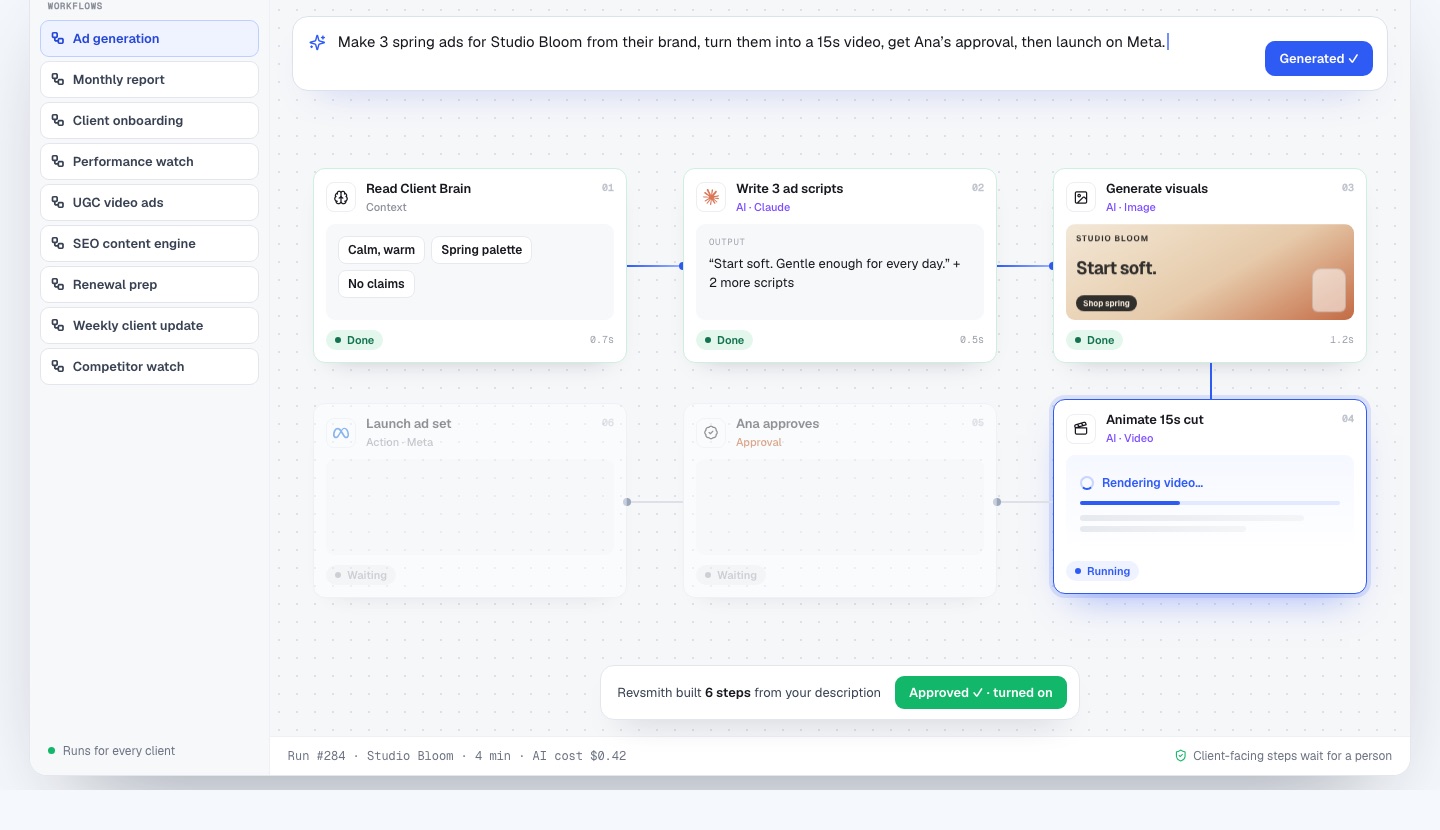
- Describe a repeatable task in plain English and it becomes a workflow that runs for every client.
- Five specialist AI teammates, each scoped to one client: Performance Analyst, SEO Strategist, Creative Lead, Social Manager and Lifecycle Specialist.
- Every number a teammate cites carries its dates and source record.
- Client-facing steps and anything that spends money wait for a named person.
When to choose ClickUp
- Your main pain is task and project tracking, and your team already lives in ClickUp.
- You want a flexible tool you can shape yourself and have time to maintain it.
- You manage internal projects as much as client work.
If that describes you, start there and add RevSmith only when scattered client context becomes the bottleneck.
When to choose RevSmith
- You run many clients and rebuild context for every task.
- Scope, approvals and promises get lost between tools.
- Onboarding takes weeks of chasing logins and files.
- The founder is the bottleneck for approvals.
- You want AI that already knows the client before it drafts.
RevSmith is young and is onboarding agencies one at a time, so expect a personal setup with the founder rather than a self-serve signup.
How RevSmith and ClickUp work together
- Keep ClickUp as your task board.
- Connect it to RevSmith so tasks created from a call or a workflow land in the right list.
- Let the Client Brain hold the scope and approver that the task cards point back to.
- Let workflows create the recurring tasks, such as a weekly update checklist, for every client.
RevSmith lists more than a thousand apps among its integrations. Confirm the exact connection you need in a demo.
How we wrote this comparison
We make RevSmith and have a stake in how this reads, so we kept claims about ClickUp to its public product description and avoided prices and feature counts that change. Last updated 23 October 2026. If something about ClickUp here is out of date or wrong, email [email protected] and we will correct it.
Frequently asked questions
Is RevSmith a ClickUp alternative?
Partly. Both can track work, but RevSmith is built around the client record, AI teammates and approvals. Many agencies keep ClickUp for tasks and connect it.
Can RevSmith create ClickUp tasks?
RevSmith lists ClickUp among its integrations, and workflows can create tasks in connected project tools. Ask in a demo about the exact setup you need.
Does ClickUp have AI?
Yes, ClickUp has built-in AI features. They work from your tasks and docs, whereas RevSmith’s teammates also read each client’s goals, scope and brand rules.
How much does RevSmith cost?
We are onboarding agencies now and set terms with each agency during onboarding, so there is no public price list yet. Book a 15-minute demo with the founder and ask.